Newly created tag disappears in the side bar in Bear Web (post sync from iOS)

Hey Dev team,

Thank you for Bear Web! Being a Windows user, I’m loving this.

I did find a bug today, details below, let me know if you need more info.

**Operation system**: Windows

Web Browser: Chrome


Bug report

What were you doing: I created a new tag (called #wealth-list-projects) in Bear iOS

What feature did you use: Creating a new tag

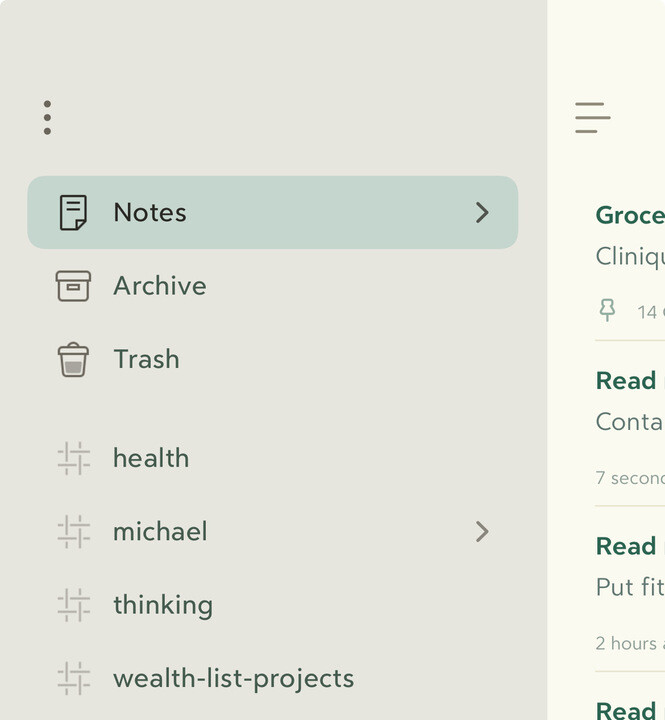
What happened: The tag did appear in Bear Web when I refreshed the page (post sync), but it went missing in less than a minute.

Screenshot from Web:

Screenshot from iOS:

**What did you expect to happen**: The tag shows up in the sidebar in web.


Feedback:

Hi, thanks for the precious feedback. To clarify, does the tag appear again if you reload Bear Web? If not, does it go missing on iOS as well? Finally, is the note tagged with the new tag still active (not archived, not trashed)? Thanks again, looking forward to solve the issue.

Thanks for the response. The tag did not appear again in Bear Web despite (repeated) reloading, and continued to say in iOS. I tried a few changes in tag name (imagining it was due to special characters or multiple words) - the behavior in Bear web stayed the same, they didn’t show up.

The next day (yesterday), the tag showed up in Bear web.
It looked like the tags synced correctly overnight! So, all good now.

1 Like