Awesome! Thanks, that is the context I was missing 
I’ve done some basic testing with copy/pasted math from my Obsidian notes and so far it’s rendered everything I’ve thrown at it beautifully, both in-line and as blocks. I’ll spend some more time with it and try to break it

1 Like
Small issue I’ve found - on iOS and iPadOS, the padding on the left and right of block equations are non-transparent. This is not an issue on macOS.

2 Likes
Another small bug - an equation inside a callout or blockquote does render, but the source latex code block is still there (just with hidden text).

1 Like
This issue is already fixed in our internal beta; the next update will bring the fix to everyone!
2 Likes
Here another issue. While a code block can be deleted simply by deleting the introductory backticks, this is not possible with math blocks. Instead a rudiment of the math block remains that can only be restored to its original form in a cumbersome way.

1 Like
I just want to voice some support for the idea of disabling it by default. I’m not the target demographic for this feature, and can confirm it’s been quite confusing and frustrating for some of my usage (though maybe I’m doing something wrong).
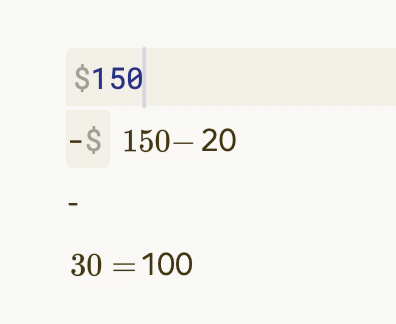
For example, notes including breakdowns of transactions put me into this feature without me wanting it. I might try to write something simple like:
$150
-$20
-$30
=$100
and it now drops me into this feature and makes the writing look unexpected and inaccurate.
To be clear, I’m happy that it will be supported (as it seems to be something others appreciate), but the current implementation has made many of my daily notes more laborious than they have been before.
Thanks for all your work!
I think nobody who writes that expects a math block. Those dollar signs even don’t belong to the same paragraph. I threw that on obsidian and it didn’t create a math block. Nothing against deactivating MathJax optionally but I think that would even confuse its users
Thank you so much for adding this feature. Finally, I can use Bear exclusively for my notes.
3 Likes
Yeah, I just tried that and there is definitely a bug where it’s interpreting single $ across multiple lines as in-line latex (seems to only be triggered when you start a line with a $) - this isn’t expected behaviour to me. IMO the only two ways to invoke MathJax rendering should be in-line with single dollar signs like this: $e=mc^2$ in a single paragraph, not across multiple lines (same way that backticks work for code snippets now) or as a block environment enclosed by $$ $$ which have to live on their own:
$$
e=mc^2
$$
I think generally it’s pretty much guaranteed that you’ll never trigger block equations by mistake, and for in-line equations it’s very unlikely but possible. In any case though, a global on-off for MathJax that is off by default seems fine to me.
Good feedback! While we in general support inlines spanning more than one line in the same paragraph, it might not be a good idea for math.
1 Like
From the mathjax documentation:
The default math delimiters are
$$...$$and\[...\]for displayed mathematics, and\(...\)for in-line mathematics. Note in particular that the$...$in-line delimiters are not used by default. That is because dollar signs appear too often in non-mathematical settings, which could cause some text to be treated as mathematics unexpectedly. For example, with single-dollar delimiters, “… the cost is $2.50 for the first one, and $2.00 for each additional one …” would cause the phrase “2.50 for the first one, and” to be treated as mathematics since it falls between dollar signs. See the section on TeX and LaTeX Math Delimiters for more information on using dollar signs as delimiters.
Perhaps Bear could use the default \(…\) notation for inline and have a setting to enable $ notation. This would make potential conflicts with $ in normal text somewhat expected for a user who has “opted in” to single $ inline. I have perl and python snippets that use $ notation in old notes so I personally would not use $ for inline but would be happy to use \( notation.
EDIT: it turns out a search of my notes for \( turns up a bunch of notes, so this is a bit of a pickle. They show up mostly inside of web links where the alias has parentheses in it.
In general, we try to avoid settings and instead have good default behavior. As the math delimiters are parsed in markdown, we need to consider interoperability with other markdown apps. We are trying to adjust the parsing to minimize unwanted math inlines while still allowing for expressive math notation embedded in text.
All reports of unexpected math inlines are valuable!
2 Likes
You can’t imagine how much this update is an game changer for me.
Thank you Devs, great job.
5 Likes
Agreed, they’ve done an amazing job with implementing this in a very “Bear” way.
Got the latest build, the previous issue with callouts is fixed but there is a slight padding transparency issue again:
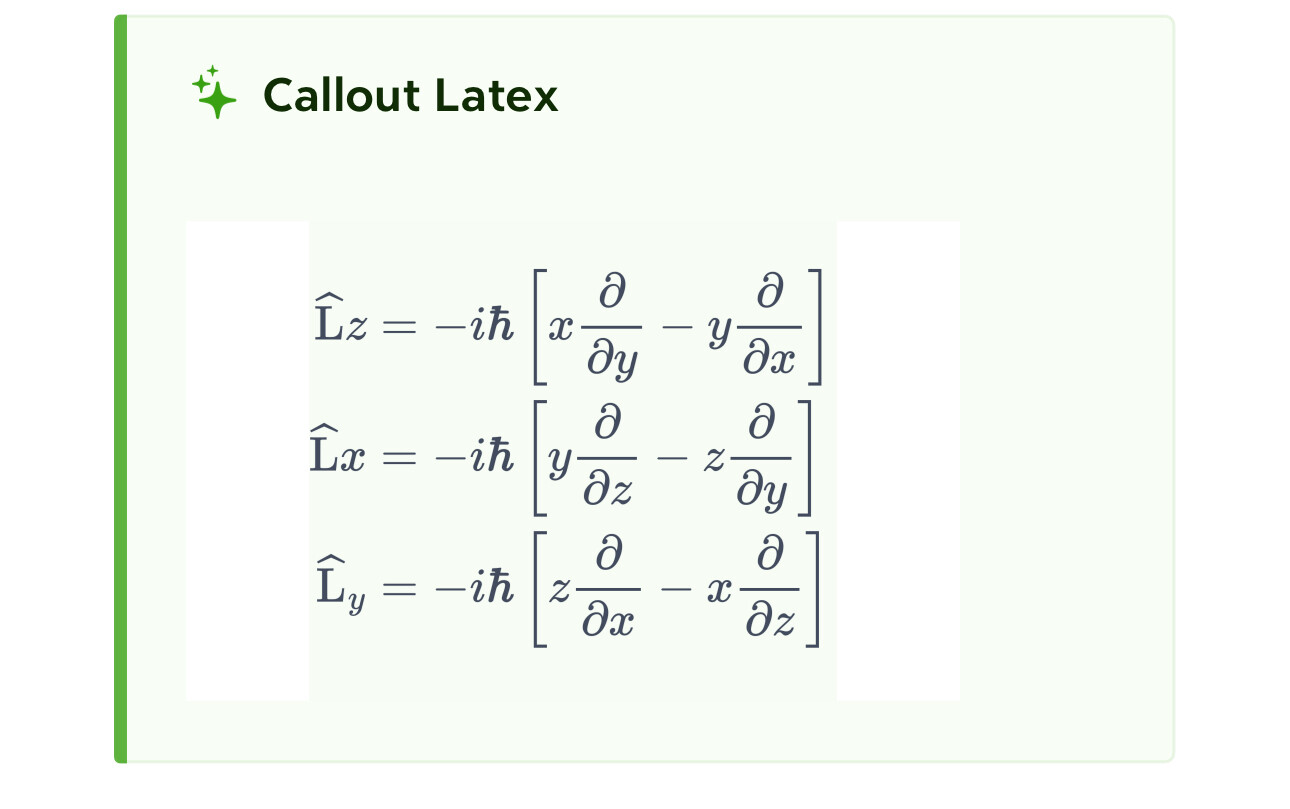
Ok, just tried this. Overall, amazing, I can move my math notes into Bear!! 

I just moved an existing note from Typora and noticed the following problems:
\rarrdoesn’t work, I have to type\rightarrow. This is annoying.- In Typora typing
\\in the middle of a latex block creates a newline, in Bear it doesn’t. This is maybe by design as the proper way to do this is to use aligned equations, but I use\\as a lazy shortcut a lot, and would really prefer it just worked. - Latex doesn’t work in table cells. This works in Typora and should just work IMO.
- Embedding
$$blocks into bullet points produces weird padding. I.e. if I’m typing text in a bullet point, type shift-enter, then$$and a formula.
Also– moving the keyboard cursor over a latex block is annoying as it changes the layout of the document. It’s a bit annoying in inline blocks and really annoying in standalone blocks. I think this is because when you move the cursor over a standalone block the document jumps vertically, and it’s jarring. I’ve seen various implementations of this and tbh nobody does this well. Perhaps there simply isn’t a great way to do it, or maybe people didn’t find one yet. I’m not sure; I’m hoping it’s possible to do better than a jarring jump.
In any case, thanks for implementing this. Love this in Bear!
1 Like
- In Typora typing
\\in the middle of a latex block creates a newline, in Bear it doesn’t. This is maybe by design as the proper way to do this is to use aligned equations, but I use\\as a lazy shortcut a lot, and would really prefer it just worked.
As far as I know this is a feature that is not implemented in the newest MathJax version yet.
2 Likes
I think some people maybe expect it because KaTeX, which some other apps use as their math back-end, does create a newline on \\ in non-Align (etc) environment. But I think MathJax is closer to “true” LaTeX here - try creating a blank doc in Overleaf (for example) and doing this:
$$
a \\
b
$$
Or:
\begin{equation}
a \\
b
\end{equation}
In both cases you’ll just get ab on the same line, just like MathJax.
2 Likes
There is a bug with inline math:
If I use the special keyboard to insert an inline math span in a sentence where there is already text, the first $ gets escaped like \$ so the inline math does not render.
If I do the same in a blank line, there is no escape character and the inline math renders as expected.
Observed in Bear 2.5.1 on iOS
1 Like
Thanks for reporting this issue. We’ll look into this as soon as possible.