What were you doing: Created a nested tag, based on an existing “parent” tag
What feature did you use: just added “/nested-tag” behind the “parent” tag
What happened: no nested tag is visible on the left side. But on my iPhone, the nested tag is visible, but not in Bear Web. Also, if I add a new nested tag first on my iPhone, the nested tag IS VISIBLE in Bear Web. So I have to first add the nested tag on my iPhone.
What did you expect to happen: nested tag should be visible in Bear Web.
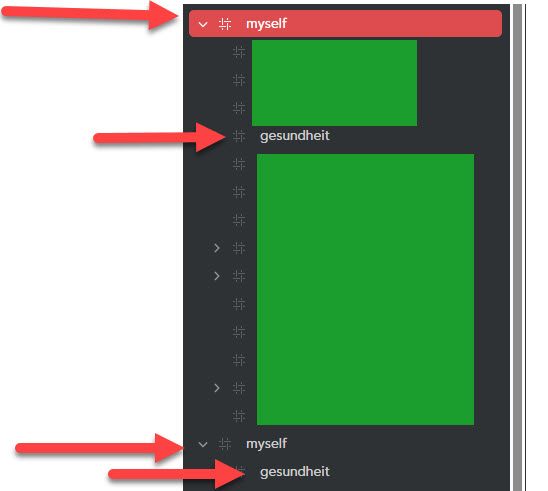
I reported the bug that prevented creating nested tags, and it has now been fixed. However, there is still an issue: When I add a nested tag in a note, the main tag and the nested tag appear twice on the left side, as if they were newly created (see image).
Has anyone else experienced this?
Operation system: Windows
Web Browser: Chrome
Bug report
What were you doing: Created a nested tag, based on an existing “parent” tag
What feature did you use: just added “/nested-tag” behind the “parent” tag
What happened: When I add a nested tag in a note, the main tag and the subtag appear twice on the left side, as if they were newly created (see image). But only in Bear Web. On my iPhone/iPad, there is no issue.
What did you expect to happen: nested tag should be visible in Bear Web, and only once
Thanks for the feedback, obviously this shouldn’t happen. We are aware of a number of issues with the way tags are matched and placed in the sidebar, and we’re currently working on this.
Hi, thanks for the follow-up. The current Bear Web should avoid creating new issues like this, but we’re currently still working on a fix for pre-existing missing tags; it’s planned to go out in the next update.
Please give a try to the latest version of Bear Web, when you have a chance. It contains a consistency check that will attempt correcting this kind of issues. Depending on the number of notes you have, It will requires some back and forth with iCloud, so give it some time (hopefully less than a minute)

 (hopefully less than a minute)